> ## Documentation Index
> Fetch the complete documentation index at: https://docs.cloudidr.com/llms.txt
> Use this file to discover all available pages before exploring further.
# Evaluations
Use this tab to **measure routing in practice**: the same prompt runs on your chosen **baseline** model and on a second model in parallel, with **LLM-as-judge** scoring and an **eval history** of your last 20 runs per user in the org.
## What this tab is for
* See whether a cheaper routed model stays "good enough" for your prompts.
* See **cost and latency savings** when routing applies.
* Keep a short **history** of runs (with delete) for demos or regression checks.
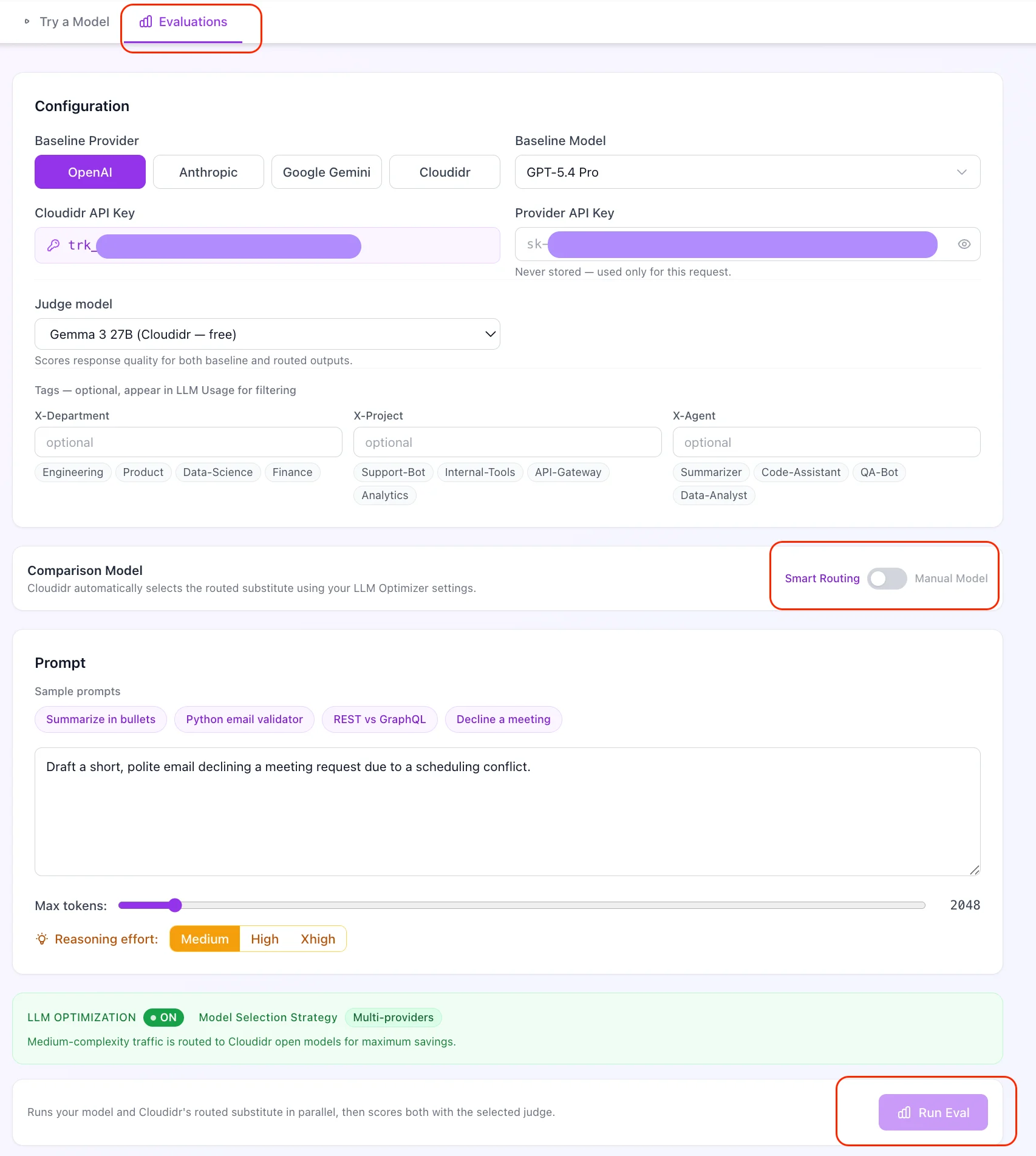
The Evaluations tab has two modes selectable at the top:
| Mode | Description |
| --------------------------- | ------------------------------------------------------------------------------------------------------------------------------------------ |
| **Smart Routing** | Cloudidr automatically picks the comparison model based on your routing strategy. Requires LLM Optimization to be **on**. |
| **Manual Model Comparison** | You choose both the baseline and comparison models from any provider. Useful for evaluating specific model pairs independently of routing. |
 ## LLM Optimization status — required for Smart Routing
A status card shows whether **LLM Optimization** is on and which **strategy** applies (e.g. **Intra Provider** vs **Flexible**).
> **Important:** If Model Routing is **off**, **Run Eval** is disabled in Smart Routing mode — there is no routed path to compare. Turn optimization on under **LLM** **Optimizer Settings**, or switch to **Manual Model Comparison** mode.
## Configuration
* **Baseline model** — same model picker as Try a Model.
* **Comparison model** — in **Manual** mode, you pick this yourself from any provider. In **Smart Routing** mode, Cloudidr selects it automatically.
* **Judge model** — pick who scores the two answers:
* **Cloudidr** (free): Gemma 3 27B or Qwen 3.5 27B or similar model is used — no API key needed.
* **Your provider key**: top-tier options per provider, for example:
* OpenAI: GPT-5.5 Pro / GPT-5.5 / GPT-5.4
* Anthropic: Claude Opus 4.6 / Claude Sonnet 4.6
* Google: Gemini 3.1 Pro / Gemini 2.5 Flash
Judge scores are **subjective**. The UI notes that **accuracy** can be unreliable for **very recent events** because models have knowledge cutoffs.
## Run Eval
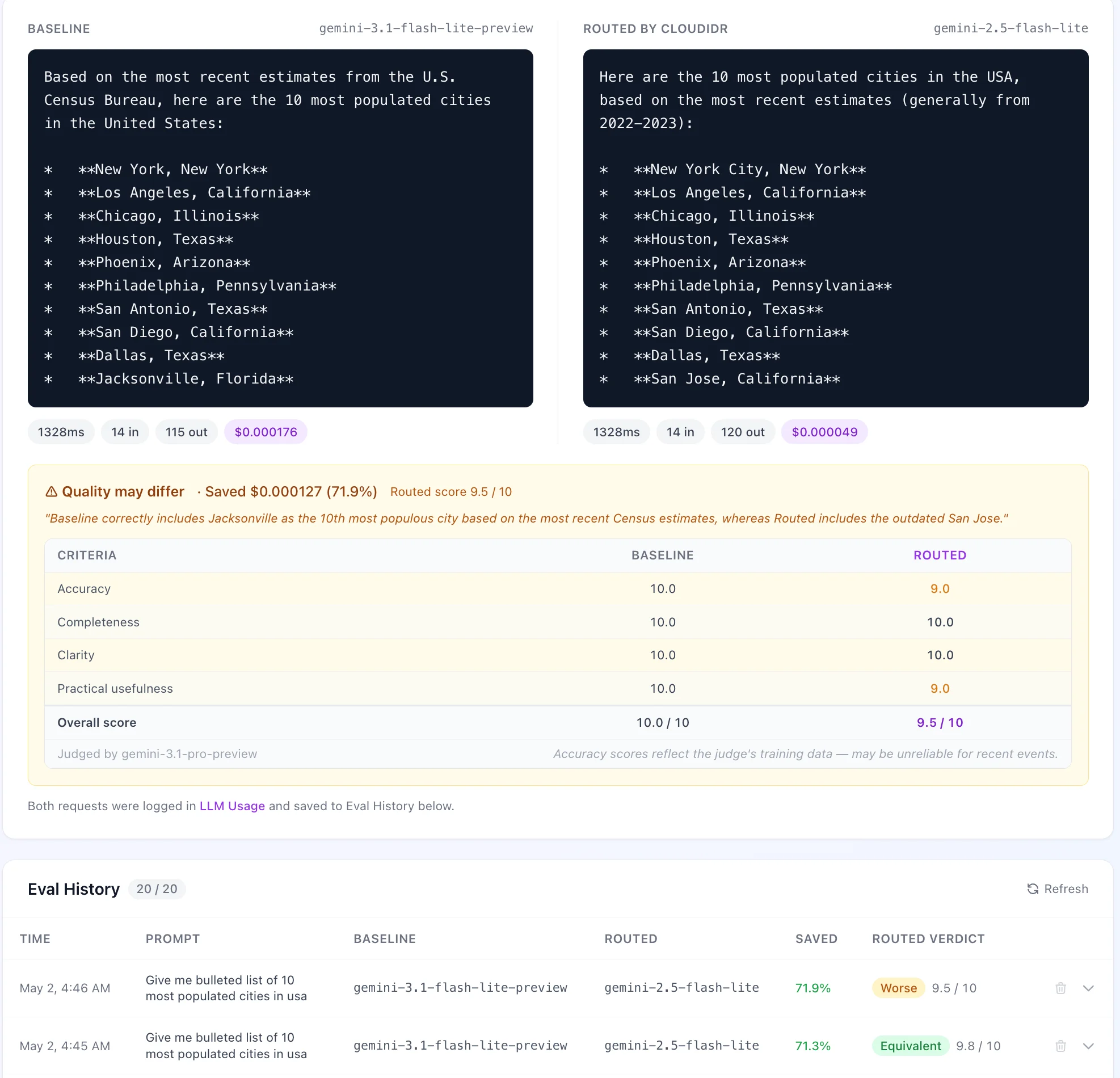
Runs both models **in parallel**, then runs the judge. Results appear side by side; savings percentage and verdict show below.
## LLM Optimization status — required for Smart Routing
A status card shows whether **LLM Optimization** is on and which **strategy** applies (e.g. **Intra Provider** vs **Flexible**).
> **Important:** If Model Routing is **off**, **Run Eval** is disabled in Smart Routing mode — there is no routed path to compare. Turn optimization on under **LLM** **Optimizer Settings**, or switch to **Manual Model Comparison** mode.
## Configuration
* **Baseline model** — same model picker as Try a Model.
* **Comparison model** — in **Manual** mode, you pick this yourself from any provider. In **Smart Routing** mode, Cloudidr selects it automatically.
* **Judge model** — pick who scores the two answers:
* **Cloudidr** (free): Gemma 3 27B or Qwen 3.5 27B or similar model is used — no API key needed.
* **Your provider key**: top-tier options per provider, for example:
* OpenAI: GPT-5.5 Pro / GPT-5.5 / GPT-5.4
* Anthropic: Claude Opus 4.6 / Claude Sonnet 4.6
* Google: Gemini 3.1 Pro / Gemini 2.5 Flash
Judge scores are **subjective**. The UI notes that **accuracy** can be unreliable for **very recent events** because models have knowledge cutoffs.
## Run Eval
Runs both models **in parallel**, then runs the judge. Results appear side by side; savings percentage and verdict show below.
 ## When routing does not apply — Smart Routing mode only
The UI explains two cases where no routing substitute is used:
1. **Recency protection** — the prompt matched recency signals; Cloudidr keeps the baseline model. You can turn **Recency protection** off under **Optimizer Settings** if you accept routing for those prompts.
2. **Complex / no substitute** — the prompt is classified as too complex for routing, or no cheaper mapped model exists. **Flexible** routing does **not** override the "complex" classification; simplifying the prompt is the practical path.
## Verdict and scores
* **Verdict** — whether the comparison answer is **Better**, **Equivalent**, or **Worse** (derived from the score delta), or **No routing** / **Too complex to route** in Smart Routing mode.
* **Score** — overall 1–10 score with a **criteria breakdown** (Accuracy, Completeness, Clarity, Practical usefulness) when the judge returns structured axes.
* If the **judge fails** (API error, parse error), an explicit error message is shown instead of silent neutral scores.
## Eval History
Table of recent runs showing: time, prompt snippet, models used, savings percentage, verdict, and score. Expand any row for the full responses, judge reasoning, and criteria breakdown.
* **Delete** removes a single run (with confirmation).
* **Bulk delete** — select multiple rows with the checkboxes and delete them all at once.
* At most **20** runs per organization are kept — the oldest run is trimmed automatically when a new one is inserted.
## When routing does not apply — Smart Routing mode only
The UI explains two cases where no routing substitute is used:
1. **Recency protection** — the prompt matched recency signals; Cloudidr keeps the baseline model. You can turn **Recency protection** off under **Optimizer Settings** if you accept routing for those prompts.
2. **Complex / no substitute** — the prompt is classified as too complex for routing, or no cheaper mapped model exists. **Flexible** routing does **not** override the "complex" classification; simplifying the prompt is the practical path.
## Verdict and scores
* **Verdict** — whether the comparison answer is **Better**, **Equivalent**, or **Worse** (derived from the score delta), or **No routing** / **Too complex to route** in Smart Routing mode.
* **Score** — overall 1–10 score with a **criteria breakdown** (Accuracy, Completeness, Clarity, Practical usefulness) when the judge returns structured axes.
* If the **judge fails** (API error, parse error), an explicit error message is shown instead of silent neutral scores.
## Eval History
Table of recent runs showing: time, prompt snippet, models used, savings percentage, verdict, and score. Expand any row for the full responses, judge reasoning, and criteria breakdown.
* **Delete** removes a single run (with confirmation).
* **Bulk delete** — select multiple rows with the checkboxes and delete them all at once.
* At most **20** runs per organization are kept — the oldest run is trimmed automatically when a new one is inserted.