> ## Documentation Index
> Fetch the complete documentation index at: https://docs.cloudidr.com/llms.txt
> Use this file to discover all available pages before exploring further.
# Budget Protection
> Configure org-wide spend alerts, per-agent monthly budgets, enforcement, and email notifications.
## Overview
| Feature | Where in the app | What it does |
| ------------------------- | ---------------------------------------- | --------------------------------------------------------------------------------------------------------------------------------------------------- |
| **Budget Alert Settings** | **Settings** → **Budget Alert Settings** | **Notifications**: email and in-app alerts when spend crosses thresholds—**org-wide** (Overall Budget tab) and/or **per-agent** (Agent Alerts tab). |
| **Budget Guard** | **Actions** → **Budget Guard** | **Limits**: set each agent’s **monthly budget** and **Enforcement** (optional hard stop on API traffic when spend exceeds that budget). |
***
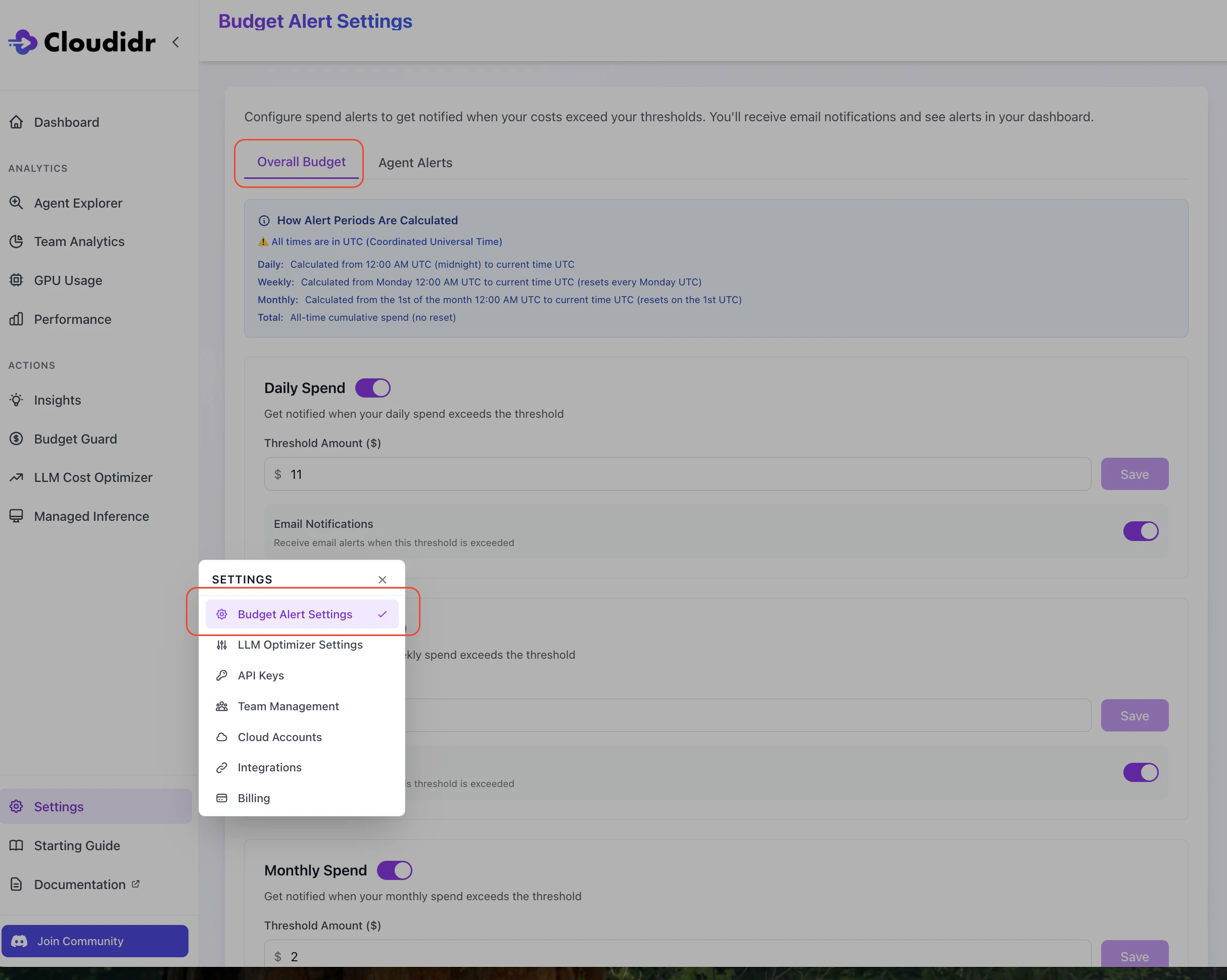
## 1. Set overall spend alerts (organization-wide)
Configure **Daily**, **Weekly**, **Monthly**, and/or **Total** org-wide spend thresholds in dollars. For each period you enable:
* Set a **threshold amount (\$)**.
* Toggle **email notifications** if you want email when that threshold is crossed.
* Click **Save** for that block.
 ***
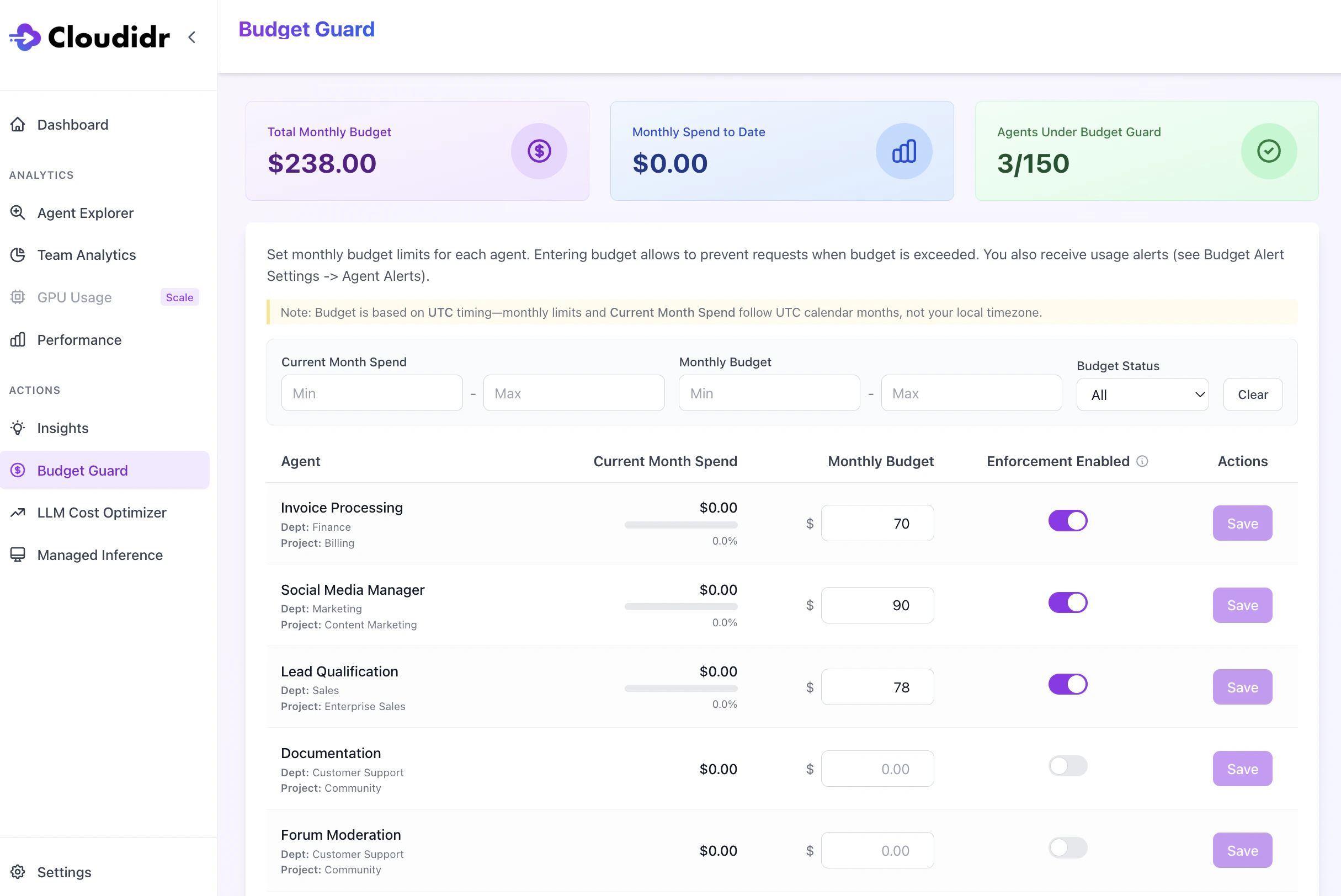
## 2. Set each agent’s monthly budget (and Enforcement on or off)
For each agent that appears (from tracked API usage with **X-Agent** and related headers):
1. Enter a **Monthly Budget** (\$) for that agent.
2. Choose **Enforcement Enabled**:
* **On** — When **Current Month Spend** (UTC month) reaches the budget, qualifying requests for that agent are **blocked** (e.g. HTTP 429 from the proxy).
* **Off** — Spend is **not** blocked; you can rely on **alerts** only (see step 1 for org-wide; step 3 for per-agent emails).
3. Click **Save** for that row.
**Summary cards** at the top show total monthly budget (for agents with enforcement), spend to date, and how many agents are under Budget Guard.
***
## 2. Set each agent’s monthly budget (and Enforcement on or off)
For each agent that appears (from tracked API usage with **X-Agent** and related headers):
1. Enter a **Monthly Budget** (\$) for that agent.
2. Choose **Enforcement Enabled**:
* **On** — When **Current Month Spend** (UTC month) reaches the budget, qualifying requests for that agent are **blocked** (e.g. HTTP 429 from the proxy).
* **Off** — Spend is **not** blocked; you can rely on **alerts** only (see step 1 for org-wide; step 3 for per-agent emails).
3. Click **Save** for that row.
**Summary cards** at the top show total monthly budget (for agents with enforcement), spend to date, and how many agents are under Budget Guard.
 > **Who can edit:** Both **organization owners and team member** can change budgets and enforcement; other roles may see read-only messaging.
> **After you save:** If you entered a **positive monthly budget** and/or turned **Enforcement** on, **per-agent email alerts** are turned **on** by default for that agent (80% / 90% / 100% of the monthly budget)—unless you had already turned alerts off for that agent on the Agent Alerts tab (see step 3).
***
## 3. Optionally turn off per-agent alerts (Budget Alert Settings → Agent Alerts)
You only need this step if you want **fewer emails** for an agent that already has a monthly budget set in **Budget Guard**.
* Find the agent in the table.
* Turn **Alerts Enabled** **off** for that agent if you do not want 80% / 90% / 100% emails.
* Use **Save** on that row if shown.
> **Who can edit:** Both **organization owners and team member** can change budgets and enforcement; other roles may see read-only messaging.
> **After you save:** If you entered a **positive monthly budget** and/or turned **Enforcement** on, **per-agent email alerts** are turned **on** by default for that agent (80% / 90% / 100% of the monthly budget)—unless you had already turned alerts off for that agent on the Agent Alerts tab (see step 3).
***
## 3. Optionally turn off per-agent alerts (Budget Alert Settings → Agent Alerts)
You only need this step if you want **fewer emails** for an agent that already has a monthly budget set in **Budget Guard**.
* Find the agent in the table.
* Turn **Alerts Enabled** **off** for that agent if you do not want 80% / 90% / 100% emails.
* Use **Save** on that row if shown.
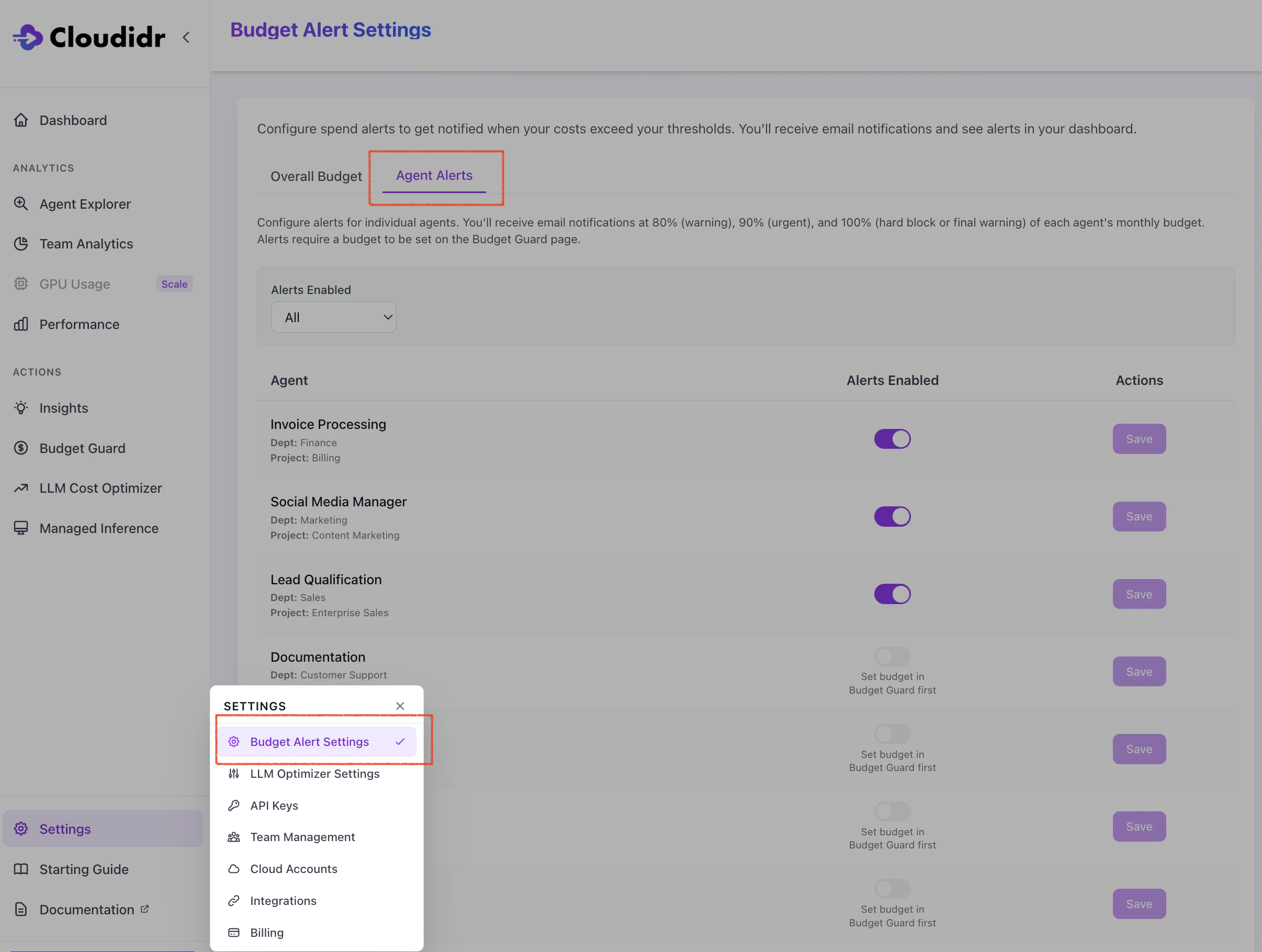 > If an agent has **no** monthly budget yet, the UI may show **Set budget in Budget Guard first** and you cannot enable alerts until step 2 is done.
***
## Troubleshooting
| Issue | What to check |
| --------------------------------------- | -------------------------------------------------------------------------------------------------------------------------- |
| No agent in Budget Guard | Agents appear after usage is tracked with **X-Agent** (and department/project) on API requests. |
| Cannot enable or configure Agent Alerts | Set a **monthly budget** in **Budget Guard** (step 2) first. |
| Enforcement does not block traffic | **Enforcement** must be **ON**; **Monthly Budget** must be **greater than zero**; evaluation uses **UTC** month. |
| Spend vs. calendar feels wrong | Budgets and “current month” use **UTC**, not your local timezone. |
| Too many emails | Use step 3: **Settings** → **Budget Alert Settings** → **Agent Alerts** → turn **Alerts Enabled** off for specific agents. |
***
> If an agent has **no** monthly budget yet, the UI may show **Set budget in Budget Guard first** and you cannot enable alerts until step 2 is done.
***
## Troubleshooting
| Issue | What to check |
| --------------------------------------- | -------------------------------------------------------------------------------------------------------------------------- |
| No agent in Budget Guard | Agents appear after usage is tracked with **X-Agent** (and department/project) on API requests. |
| Cannot enable or configure Agent Alerts | Set a **monthly budget** in **Budget Guard** (step 2) first. |
| Enforcement does not block traffic | **Enforcement** must be **ON**; **Monthly Budget** must be **greater than zero**; evaluation uses **UTC** month. |
| Spend vs. calendar feels wrong | Budgets and “current month” use **UTC**, not your local timezone. |
| Too many emails | Use step 3: **Settings** → **Budget Alert Settings** → **Agent Alerts** → turn **Alerts Enabled** off for specific agents. |
***