> ## Documentation Index
> Fetch the complete documentation index at: https://docs.cloudidr.com/llms.txt
> Use this file to discover all available pages before exploring further.
# LLM Cost Savings
> Organization-wide optimizer settings, savings reporting, per-agent overrides, and how non-tagged traffic appears in metrics
## Overview
| Area | Where in the app | What it does |
| --------------------------- | --------------------------------------------------------------------------------- | ------------------------------------------------------------------------------------------------------------------------------------------------------------------- |
| **LLM Optimizer Settings** | **Settings** → **LLM Optimizer Settings** | **Defaults**: turn optimization on/off, choose provider and routing strategy, safety fallback behavior, and whether to optimize requests **without** agent tagging. |
| **LLM Cost Optimizer** | **Actions** → **LLM Cost Optimizer** | **Reporting**: summary cards, filters, and a breakdown table (by department / project / agent) including a **Non-Tagged** row when applicable. |
| **Per-agent configuration** | Same page (**LLM Cost Optimizer**), section **Advanced: Per-Agent Configuration** | **Overrides**: when global optimization is on, each agent can be included or excluded without changing org defaults. |
| | | |
***
## 1. LLM Optimizer Settings (organization defaults)
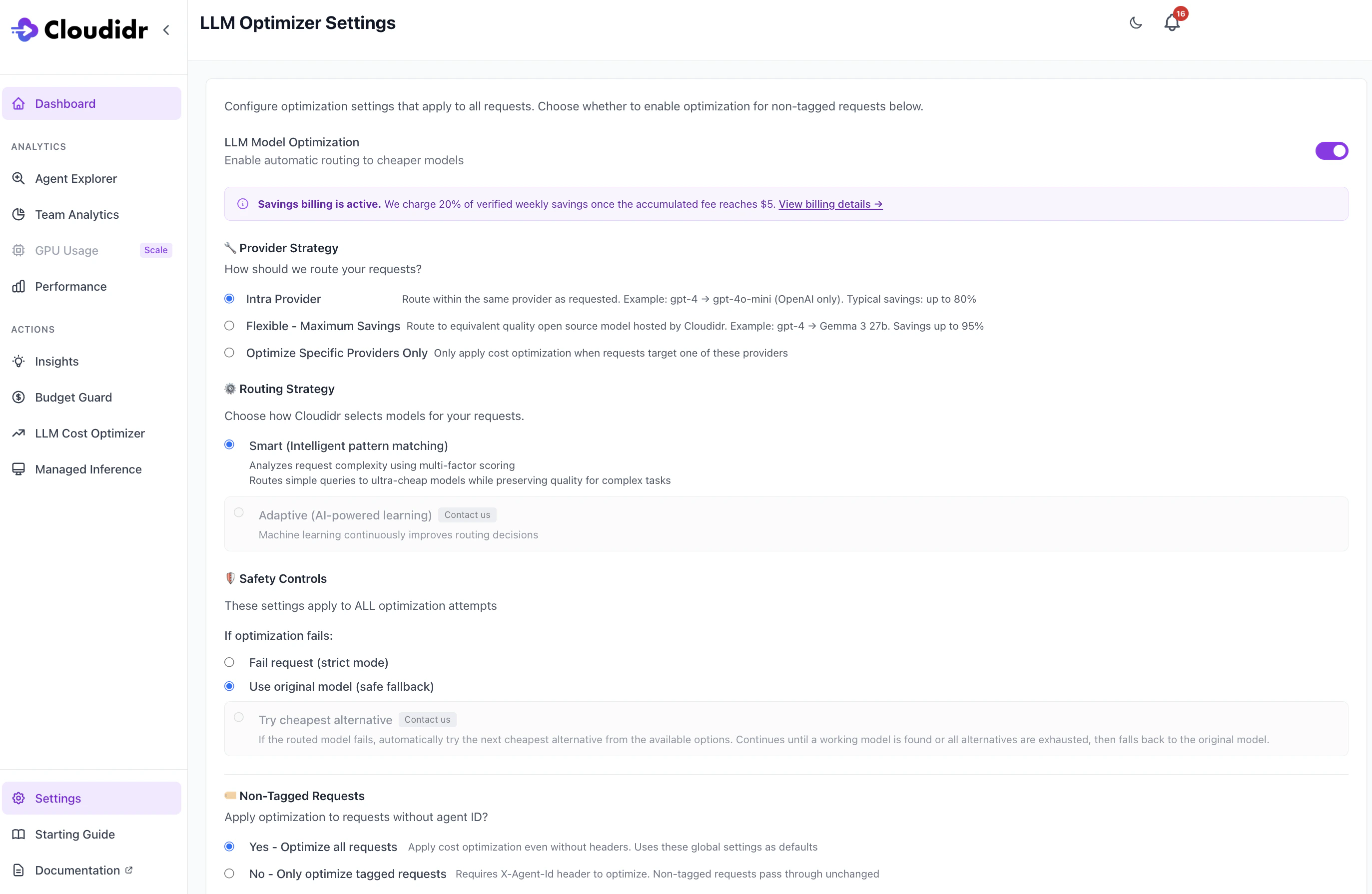 ### LLM Model Optimization (master toggle)
When **on**, Cloudidr may route eligible API traffic to cheaper models according to the strategies below. When **off**, requests use the model the client asked for (no automatic substitution).
### Provider strategy
Controls **how far** routing may move from the originally requested provider:
* **Intra Provider** — Stay within the same upstream provider (for example, a more expensive OpenAI model → a cheaper OpenAI model). Typical savings are lower than cross-provider options but preserve provider-specific behavior.
* **Flexible - Maximum Savings** — May route to **Cloudidr-hosted** open models for higher potential savings. This path can require **prepaid credits**; if the balance is zero, the UI may disable or warn until credits are added.
* **Optimize Specific Providers Only** — Optimization runs only when the request targets one of the **selected** providers (OpenAI, Anthropic, Google, AWS Bedrock). Use the checkboxes that appear when this option is selected.
### Domain Plugins
These plugins enhance model routing ability based on semantics associated with the domain. Available plugins are for banking/financials, healthcare, legal, and engineering.
### Routing strategy
* **Smart (Intelligent pattern matching)** — Uses complexity-style scoring so simple prompts can be sent to very cheap models while harder tasks keep stronger models.
* **Adaptive (AI-powered learning)** — Shown as **contact us** / not selectable in the current UI; reserved for future or custom rollout.
### Safety controls (if optimization fails)
These apply to **all** optimization attempts (tagged and non-tagged):
* **Fail request (strict mode)** — Return an error if a substitute model cannot be used as planned.
* **Use original model (safe fallback)** — Fall back to the **original** model the client requested so the request still completes.
* **Try cheapest alternative** — Shown as **contact us** / not selectable in the current UI.
### Non-tagged requests
* **Yes - Optimize all requests** — Optimization may run even when the client does **not** send tagging headers. Those requests use these **global** defaults (unless a per-agent rule applies—tagged traffic can still use agent-specific settings when present).
* **No - Only optimize tagged requests** — Requests **without** an agent identifier skip optimization and pass through unchanged.
> Enabling optimization typically requires a **payment method on file** or **positive org prepaid credits** (the product bills a percentage of verified savings—see the in-app banner and subscription screens). If optimization is off and the org has no funding source, the UI explains that a card or credits are needed before turning optimization on.
### Recency protection
**Recency protection** is an optional (default **on**) layer in Cloudidr’s routing pipeline. If the user’s prompt looks like it needs **current world knowledge** (news, live markets, who holds a role today, “as of” dates, etc.), Cloudidr **does not substitute a cheaper model** and keeps traffic on the **baseline model** the customer selected.
**Why it exists:** Cheaper routed models often have **older or different training cutoffs**. For “who won the last election?” or “what is Apple’s stock price?” routing to a smaller model can increase **factual wrongness** even when the prompt is *simple* in complexity terms. Recency protection trades possible cost savings for **lower risk of stale answers** on those prompts.
**What it is not:** It does not call an external search, web browse, or “grounding” API. It is **phrase-based detection** on the prompt text only, then a **skip-routing** decision.
***
## 2. LLM Cost Optimizer (savings and breakdown)
### LLM Model Optimization (master toggle)
When **on**, Cloudidr may route eligible API traffic to cheaper models according to the strategies below. When **off**, requests use the model the client asked for (no automatic substitution).
### Provider strategy
Controls **how far** routing may move from the originally requested provider:
* **Intra Provider** — Stay within the same upstream provider (for example, a more expensive OpenAI model → a cheaper OpenAI model). Typical savings are lower than cross-provider options but preserve provider-specific behavior.
* **Flexible - Maximum Savings** — May route to **Cloudidr-hosted** open models for higher potential savings. This path can require **prepaid credits**; if the balance is zero, the UI may disable or warn until credits are added.
* **Optimize Specific Providers Only** — Optimization runs only when the request targets one of the **selected** providers (OpenAI, Anthropic, Google, AWS Bedrock). Use the checkboxes that appear when this option is selected.
### Domain Plugins
These plugins enhance model routing ability based on semantics associated with the domain. Available plugins are for banking/financials, healthcare, legal, and engineering.
### Routing strategy
* **Smart (Intelligent pattern matching)** — Uses complexity-style scoring so simple prompts can be sent to very cheap models while harder tasks keep stronger models.
* **Adaptive (AI-powered learning)** — Shown as **contact us** / not selectable in the current UI; reserved for future or custom rollout.
### Safety controls (if optimization fails)
These apply to **all** optimization attempts (tagged and non-tagged):
* **Fail request (strict mode)** — Return an error if a substitute model cannot be used as planned.
* **Use original model (safe fallback)** — Fall back to the **original** model the client requested so the request still completes.
* **Try cheapest alternative** — Shown as **contact us** / not selectable in the current UI.
### Non-tagged requests
* **Yes - Optimize all requests** — Optimization may run even when the client does **not** send tagging headers. Those requests use these **global** defaults (unless a per-agent rule applies—tagged traffic can still use agent-specific settings when present).
* **No - Only optimize tagged requests** — Requests **without** an agent identifier skip optimization and pass through unchanged.
> Enabling optimization typically requires a **payment method on file** or **positive org prepaid credits** (the product bills a percentage of verified savings—see the in-app banner and subscription screens). If optimization is off and the org has no funding source, the UI explains that a card or credits are needed before turning optimization on.
### Recency protection
**Recency protection** is an optional (default **on**) layer in Cloudidr’s routing pipeline. If the user’s prompt looks like it needs **current world knowledge** (news, live markets, who holds a role today, “as of” dates, etc.), Cloudidr **does not substitute a cheaper model** and keeps traffic on the **baseline model** the customer selected.
**Why it exists:** Cheaper routed models often have **older or different training cutoffs**. For “who won the last election?” or “what is Apple’s stock price?” routing to a smaller model can increase **factual wrongness** even when the prompt is *simple* in complexity terms. Recency protection trades possible cost savings for **lower risk of stale answers** on those prompts.
**What it is not:** It does not call an external search, web browse, or “grounding” API. It is **phrase-based detection** on the prompt text only, then a **skip-routing** decision.
***
## 2. LLM Cost Optimizer (savings and breakdown)
 ### Top summary cards
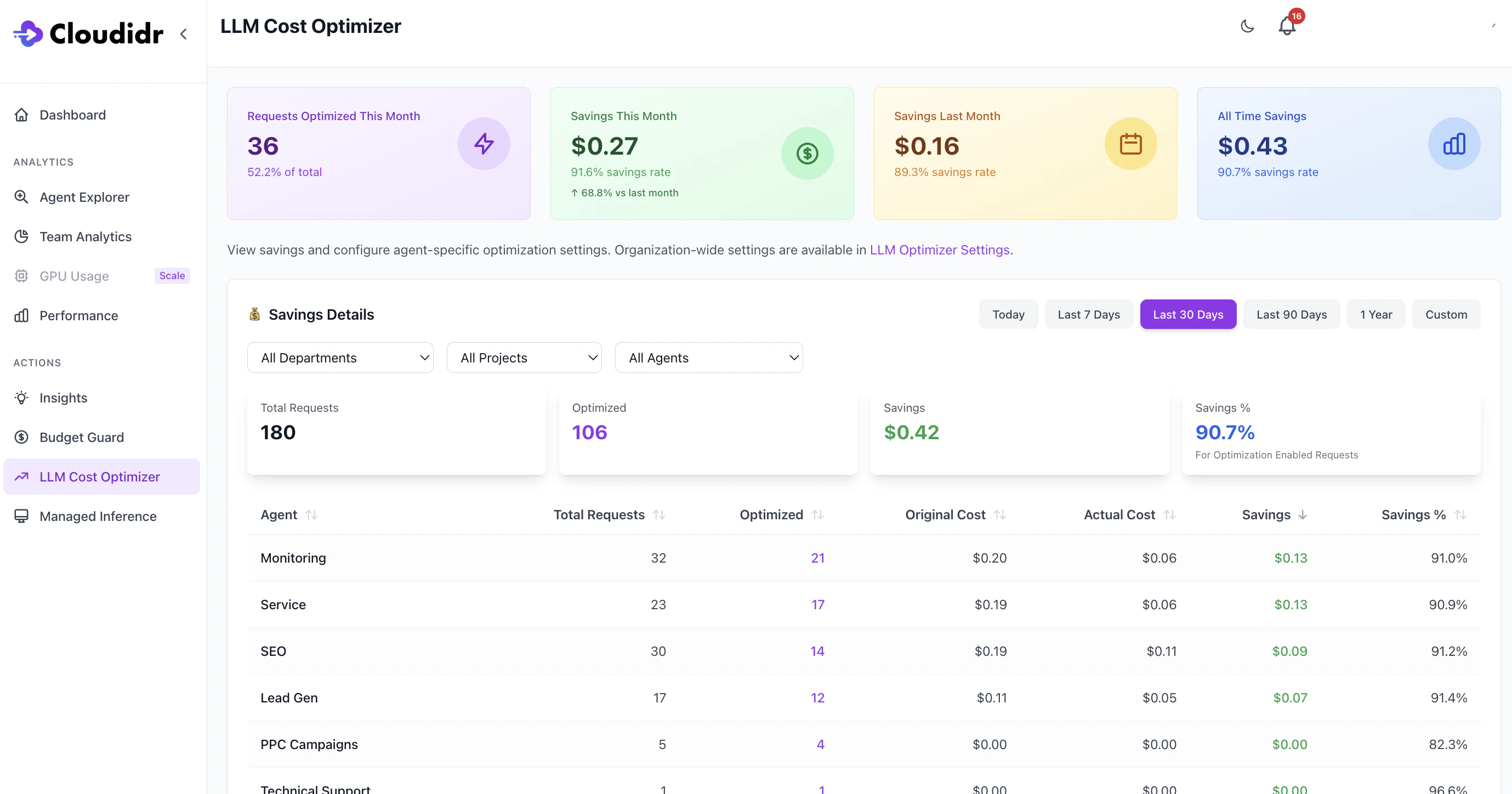
Typical cards include:
* **Requests Optimized This Month** — Count and share of traffic that used an optimized route in the **current calendar month** (definitions are shown on the page).
* **Savings This Month** — Dollar savings and savings rate for the current month, often with a comparison to the prior month.
* **Savings Last Month** — Prior month totals for quick comparison.
* **All Time Savings** — Cumulative verified savings since tracking began for the org.
These roll up **all** included traffic in scope for the optimizer, including rows that have no agent tag (see below).
### Savings Details (filters and aggregates)
Use **Department**, **Project**, and **Agent** filters and the **time range** (Today, 7 / 30 / 90 days, year, custom) to focus the view.
The aggregate line (**Total Requests**, **Optimized**, **Savings**, **Savings %**) reflects the **filtered** period and dimensions. Percentages are computed from **optimization-enabled** traffic as labeled on the page.
### Agent breakdown table
Each row is one **agent dimension** (department / project / agent). Metrics include total requests, how many were optimized, original vs actual cost, savings, and savings rate.
**Non-tagged requests in savings**
When **Yes - Optimize all requests** is enabled and the proxy **does** apply optimization to traffic without `X-Agent` (and related) tags, those requests are stored **without** an agent name in usage data and reported "Non-tagged".
***
## 3. Advanced: Per-Agent Configuration
### Top summary cards
Typical cards include:
* **Requests Optimized This Month** — Count and share of traffic that used an optimized route in the **current calendar month** (definitions are shown on the page).
* **Savings This Month** — Dollar savings and savings rate for the current month, often with a comparison to the prior month.
* **Savings Last Month** — Prior month totals for quick comparison.
* **All Time Savings** — Cumulative verified savings since tracking began for the org.
These roll up **all** included traffic in scope for the optimizer, including rows that have no agent tag (see below).
### Savings Details (filters and aggregates)
Use **Department**, **Project**, and **Agent** filters and the **time range** (Today, 7 / 30 / 90 days, year, custom) to focus the view.
The aggregate line (**Total Requests**, **Optimized**, **Savings**, **Savings %**) reflects the **filtered** period and dimensions. Percentages are computed from **optimization-enabled** traffic as labeled on the page.
### Agent breakdown table
Each row is one **agent dimension** (department / project / agent). Metrics include total requests, how many were optimized, original vs actual cost, savings, and savings rate.
**Non-tagged requests in savings**
When **Yes - Optimize all requests** is enabled and the proxy **does** apply optimization to traffic without `X-Agent` (and related) tags, those requests are stored **without** an agent name in usage data and reported "Non-tagged".
***
## 3. Advanced: Per-Agent Configuration
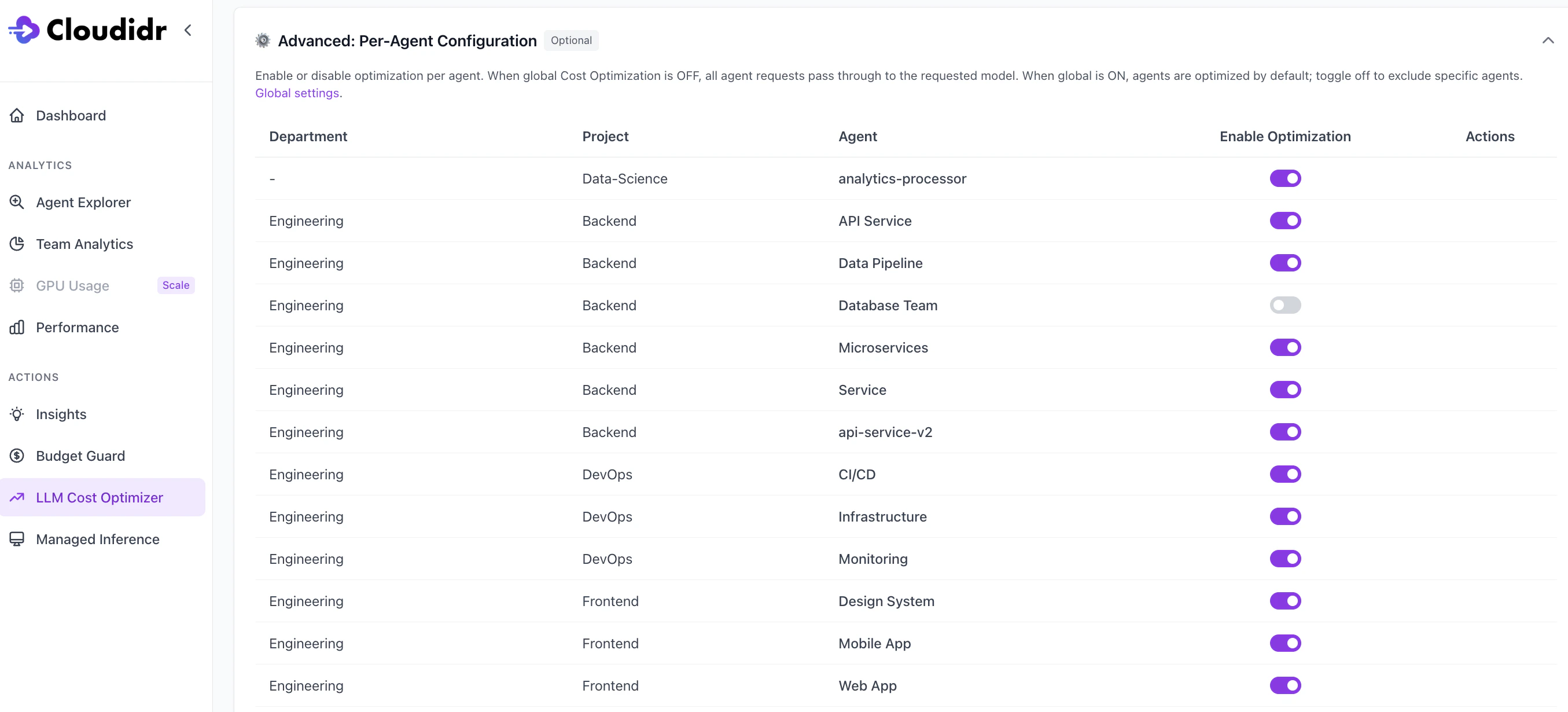 Optional table: **Department**, **Project**, **Agent**, and **Enable Optimization** per row.
* When **global** LLM Model Optimization is **off**, **no** agent traffic is optimized (all requests use the requested model).
* When global optimization is **on**, agents are **included by default**; turn **off** for specific agents to **exclude** them from optimization while leaving others unchanged.
> if the agent is **disabled** in **Advanced: Per-Agent Configuration**, those requests are **not** optimized, **regardless** of **Yes – Optimize all requests**.
***
## Who can change settings
**Saving organization defaults** (toggle, strategies, safety, non-tagged behavior) requires an **organization owner** (`super_user`), same as other org-wide billing-related settings. Team members can open the pages; only owners can persist changes where the API enforces `get_super_user`.
***
## Quick reference: non-tagged traffic
| Setting | Behavior |
| -------------------------------------- | --------------------------------------------------------------------------------------------------------------------------------------------------------------------- |
| **Yes - Optimize all requests** | Non-tagged requests can be optimized using org defaults; successful optimizations contribute savings and appear under a **Non-Tagged** row (and in top-level totals). |
| **No - Only optimize tagged requests** | Send **`X-Agent`** (and optional department/project headers) if you want a row per agent; non-tagged traffic is not optimized by default. |
Optional table: **Department**, **Project**, **Agent**, and **Enable Optimization** per row.
* When **global** LLM Model Optimization is **off**, **no** agent traffic is optimized (all requests use the requested model).
* When global optimization is **on**, agents are **included by default**; turn **off** for specific agents to **exclude** them from optimization while leaving others unchanged.
> if the agent is **disabled** in **Advanced: Per-Agent Configuration**, those requests are **not** optimized, **regardless** of **Yes – Optimize all requests**.
***
## Who can change settings
**Saving organization defaults** (toggle, strategies, safety, non-tagged behavior) requires an **organization owner** (`super_user`), same as other org-wide billing-related settings. Team members can open the pages; only owners can persist changes where the API enforces `get_super_user`.
***
## Quick reference: non-tagged traffic
| Setting | Behavior |
| -------------------------------------- | --------------------------------------------------------------------------------------------------------------------------------------------------------------------- |
| **Yes - Optimize all requests** | Non-tagged requests can be optimized using org defaults; successful optimizations contribute savings and appear under a **Non-Tagged** row (and in top-level totals). |
| **No - Only optimize tagged requests** | Send **`X-Agent`** (and optional department/project headers) if you want a row per agent; non-tagged traffic is not optimized by default. |