> ## Documentation Index
> Fetch the complete documentation index at: https://docs.cloudidr.com/llms.txt
> Use this file to discover all available pages before exploring further.
# Team Management
Owners can invite team members to join Cloudidr. The first user who signed up with the company name is the Owner. Owner can invite other users and pay for the subscription. Here are the steps to invite team members
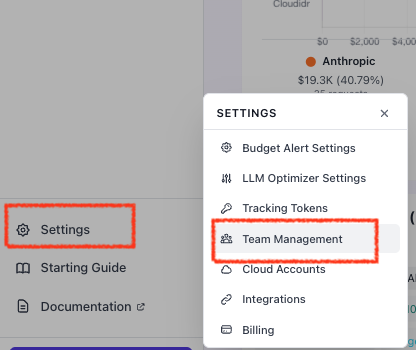
1. Go to **Settings** in left side panel and click **Team Managment**
 2 Click on **+ Invite Team Member** to send invitation. The team members an then sign up as Members
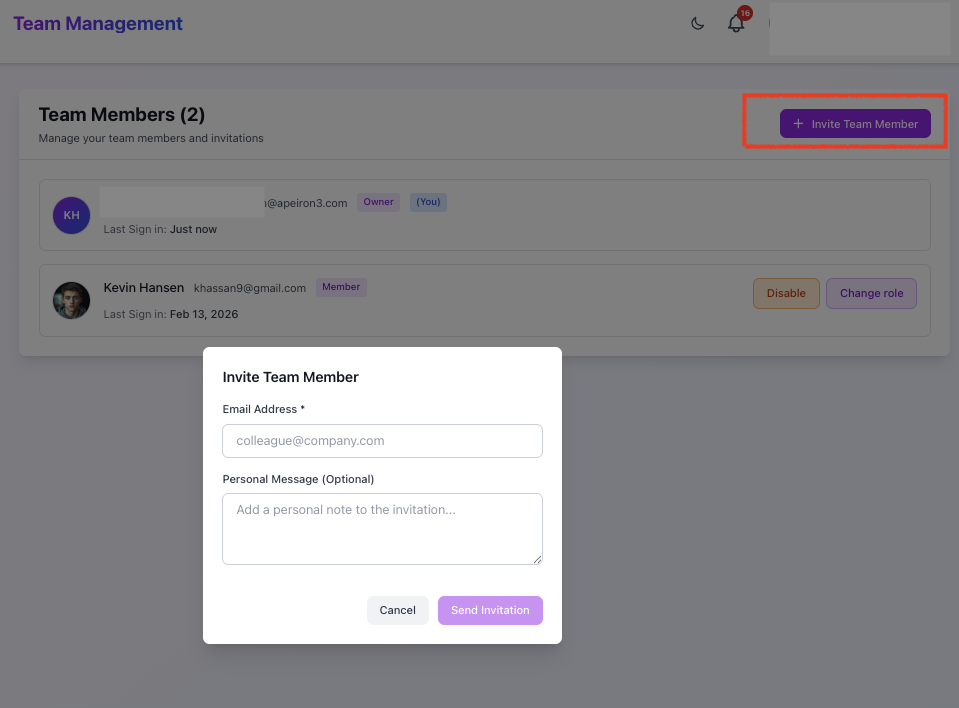 3. Owner can **Change role** for team members from Team management page, enable/disable member.
4. Owner can make other members as owners as well.
5. Owner can use **Team Analytics** side panel to view usage across each team member.
6. Owner can use **Settings** > **API Keys** to **revoke** API Keys for team members.
3. Owner can **Change role** for team members from Team management page, enable/disable member.
4. Owner can make other members as owners as well.
5. Owner can use **Team Analytics** side panel to view usage across each team member.
6. Owner can use **Settings** > **API Keys** to **revoke** API Keys for team members.