> ## Documentation Index
> Fetch the complete documentation index at: https://docs.cloudidr.com/llms.txt
> Use this file to discover all available pages before exploring further.
# Try Model
Use this tab to **experiment with one model at a time**—same flow as a minimal chat client, but requests go through the proxy and are logged like production traffic.
## What this tab is for
* Validate that your tracking token and tags work.
* Compare latency and cost across providers or models.
* Try sample prompts or paste your own text.
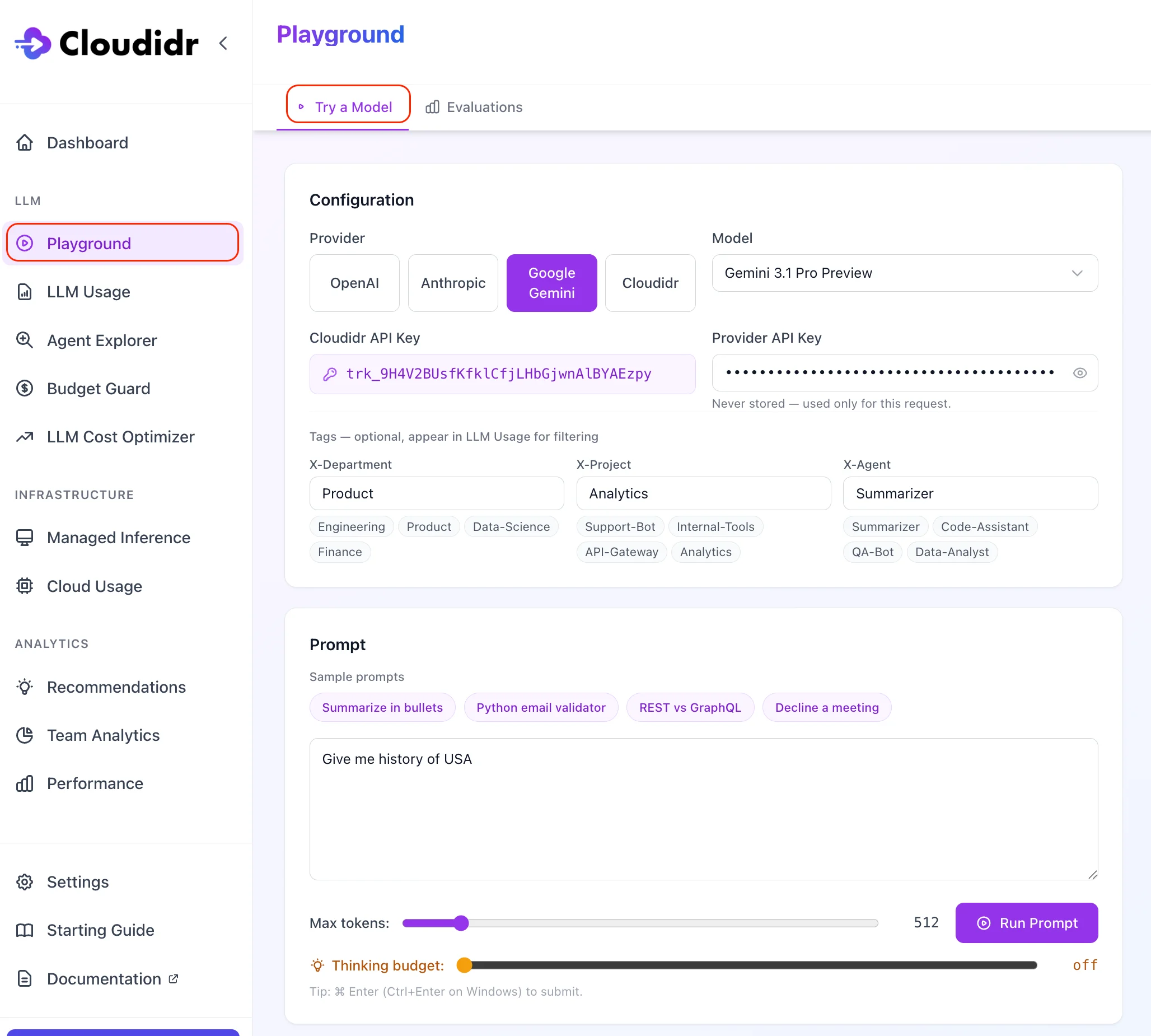
## Configuration
### Provider and API key
Choose **OpenAI**, **Anthropic**, **Google Gemini**, or **Cloudidr**.
* **Third-party providers** (OpenAI, Anthropic, Google): paste your own provider API key. The key is sent with the request and is **not** stored by Cloudidr.
* **Cloudidr**: select a managed model (Gemma or Qwen). Uses your Cloudidr tracking token only; **Managed Inference credits** apply. If your org has no credits, Cloudidr models are blocked with a clear billing message.
### Model
Pick a **model** from the list for the selected provider. Lists are ordered with newer / flagship entries first where applicable.
### Tracking token (Cloudidr API key)
Pick the default tracking token or choose another active token from the dropdown. This ties the run to your org for usage and billing.
### Tags (optional)
Optional **X-Department**, **X-Project**, and **X-Agent** values (with sample chips) flow into **LLM Usage** as dimensions for filtering—same headers as the proxy.
 ## Prompt and sample prompts
Enter any prompt in the text field. **Sample prompts** (e.g. summarize in bullets, REST vs GraphQL) fill the editor in one click.
### Max tokens
Caps the model’s completion length for this run.
### Thinking budget (Gemini and Qwen only)
For **Google Gemini** and **Cloudidr Qwen**, a **thinking budget** slider controls how many tokens may be used for internal reasoning before the visible answer. If thinking consumes the whole **max tokens** budget, the UI explains that you should raise max tokens. **Gemma** does not use this control.
### Run Prompt
Submits the request. Keyboard shortcut: **⌘ Enter** (Mac) or **Ctrl+Enter** (Windows).
## Response panel
Shows the assistant text plus **model**, **latency**, **input / thinking / output tokens**, and **estimated cost**. A note confirms the request was logged to **LLM Usage**.
## Prompt and sample prompts
Enter any prompt in the text field. **Sample prompts** (e.g. summarize in bullets, REST vs GraphQL) fill the editor in one click.
### Max tokens
Caps the model’s completion length for this run.
### Thinking budget (Gemini and Qwen only)
For **Google Gemini** and **Cloudidr Qwen**, a **thinking budget** slider controls how many tokens may be used for internal reasoning before the visible answer. If thinking consumes the whole **max tokens** budget, the UI explains that you should raise max tokens. **Gemma** does not use this control.
### Run Prompt
Submits the request. Keyboard shortcut: **⌘ Enter** (Mac) or **Ctrl+Enter** (Windows).
## Response panel
Shows the assistant text plus **model**, **latency**, **input / thinking / output tokens**, and **estimated cost**. A note confirms the request was logged to **LLM Usage**.