
- Your API keys are never stored. They pass through in memory for mili-seconds during each request and are immediately discarded. We never write them to disk, never log them, and never store them in our database. Your prompts and responses remain completely private.
- You pay your provider directly. LLM Ops does not sit in your billing path. Your AWS Bedrock charges go to AWS. Your OpenAI charges go to OpenAI. Your existing contracts, enterprise discounts, and committed spend agreements are completely unaffected. We only charge for LLM Ops itself.
The Problem — AI Costs Are Invisible Until It’s Too Late
Your AI bill went from $200 to $8,000 in one month. Your CFO asks: “Why?” Without LLM Ops, you cannot answer:- Which project or agent caused the spike?
- Are we using Claude Opus for tasks Haiku could handle at 20x lower cost?
- Which Bedrock models are being called and at what frequency?
- Where is budget being wasted on over-provisioned model capacity?
- What would we save if we routed simple requests to cheaper models?
How LLM Ops Works
LLM Ops sits as a transparent proxy between your application and your AI providers. Every API call passes through the Cloudidr proxy endpoint, which logs metadata in real time and optionally applies routing and budget enforcement — then forwards the request to your chosen provider unchanged.Your Application ↓ Cloudidr LLM Ops Proxy (api.llm-ops.cloudidr.com) ↓ tracks metadata, enforces budgets, applies routing AI Provider (AWS Bedrock / OpenAI / Anthropic / Gemini) ↓ Response returned to your applicationYour API keys are never stored. They pass through securely via HTTPS and are immediately discarded after the request completes — typically within 1-2 seconds. We only log metadata: token counts, model names, timestamps, and calculated costs. Your prompts and responses remain completely private and are never stored. Latency overhead: under 40ms on average. Your users will not notice the difference as the providers 2 way latencies are 800-2000ms.
Simple Integration — 2 Lines of Code
Add 2 lines of code to start tracking. See example below for OpenAI.Supported Providers
Key Capabilities
1. Real-Time Cost Visibility
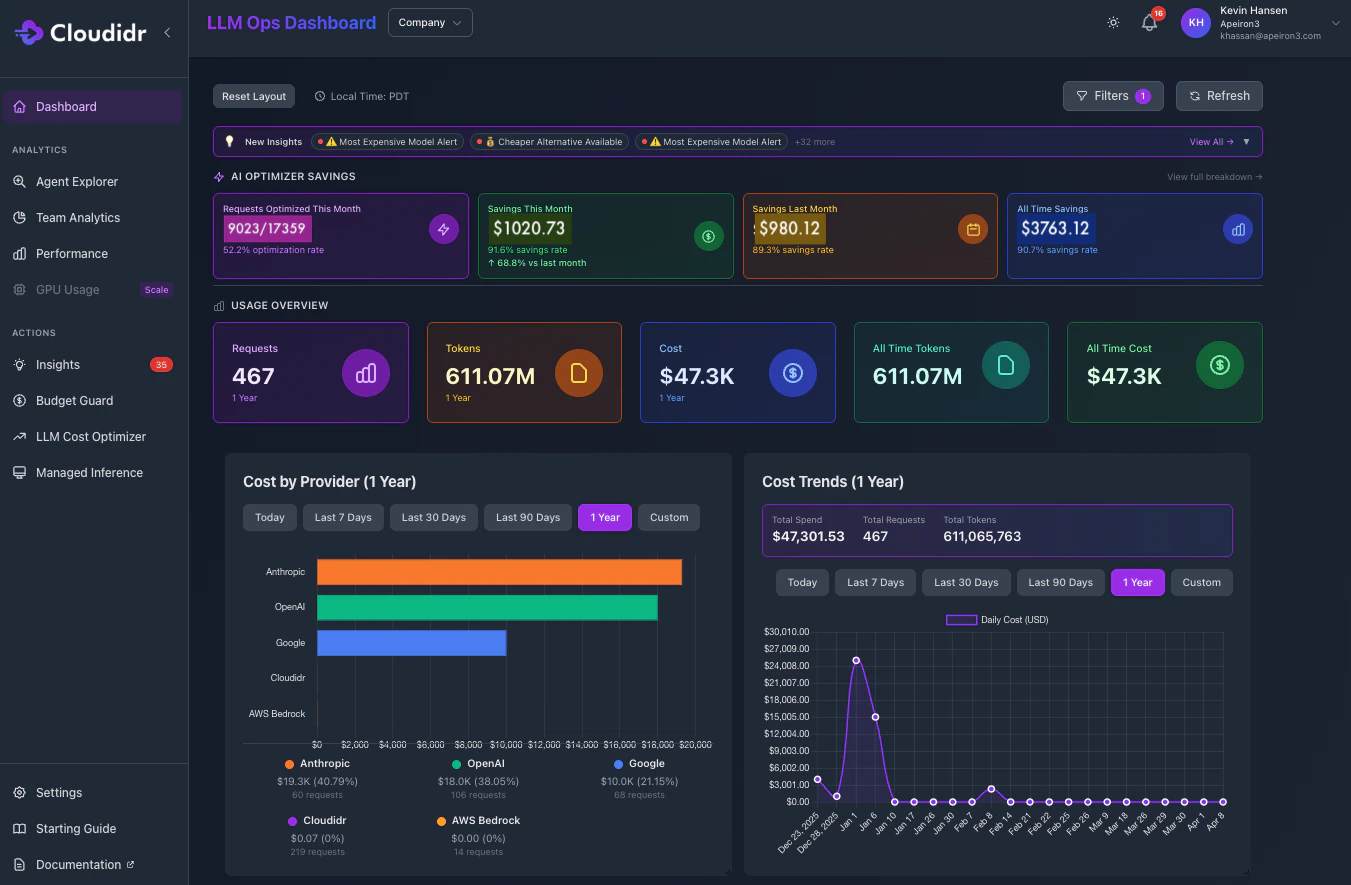
Track LLM spending across all providers in a single unified dashboard. See costs broken down by:- Department — Engineering vs Marketing vs Product
- Project — Individual projects
- Agent or Feature — Customer support bot, code assistant, content generator, RAG pipeline
- Model — Which specific models are consuming budget
- Provider — AWS Bedrock vs OpenAI vs Anthropic vs Gemini
- Time — Hourly, daily, weekly, and monthly trends
2. Hard Budget Controls — Budget Guard
Set hard spending limits per agent, team, project, or API key. When the limit is reached, requests automatically block — no overages, no surprises.- Alerts fire at 80% and 90% of budget
- Requests auto-block at 100% — not just alert
- Budget Guard supports up to 5 agents on the free tier, 30 on Growth, and unlimited on Scale and Enterprise
- Works across all providers simultaneously from a single control layer
3. Intelligent Model Routing
Smart routing automatically selects the cheapest model capable of handling each request based on complexity scoring. You define the quality threshold — LLM Ops handles the routing decision. Three routing strategies: Intra Provider (available on all plans) Routes within a single provider’s model family based on task complexity. Examples:- Claude Opus → routed to Claude Haiku for simple prompts
- Nova Premier → routed to Nova Micro for lightweight tasks
- GPT-4o → routed to GPT-4o Mini where complexity allows
4. AI-Powered Optimization Insights
LLM Ops continuously analyzes your usage patterns and surfaces actionable recommendations:- Which requests could use cheaper models without quality loss
- Where you are over-provisioning capacity
- Opportunities to batch requests for cost reduction
- Potential monthly savings from model switching
- Cost anomalies and unusual spending patterns flagged automatically
5. GPU Usage and Compute Metrics
For teams running self-hosted or GPU-accelerated inference workloads, LLM Ops extends visibility beyond API costs to include:- GPU utilization tracking
- Compute cost per inference
- GPU instance efficiency metrics
- Cost comparison between API and self-hosted inference
6. Forecasting
Project future LLM spending based on current usage trends:- Monthly spend forecasts by team and agent
- Budget runway estimates
- Growth trend analysis
- Capacity planning recommendations
Why Teams Choose LLM Ops
60-second setup — No complex installation, no infrastructure changes. Add 2 lines of code and you are tracking costs across every provider. Under 40ms overhead — Your API calls go directly to providers via HTTPS. Users do not notice the difference. Free forever for small teams — Core features including cost tracking, Budget Guard, smart routing, and multi-provider support are completely free. No credit card required. Privacy first — API keys never stored. Prompts and responses never logged. Only metadata is tracked: token counts, model names, timestamps, and costs. Full encryption in transit and at rest. No vendor lock-in — Remove 2 lines of code and your application connects directly to your AI provider exactly as before. Nothing changes on your provider side. Works with AWS Bedrock natively — No changes to your AWS account, IAM roles, or billing. Your Bedrock relationship stays between you and AWS.Who Uses LLM Ops
AI Startups Track costs as you scale from $100 to tens of thousands per month. Catch runaway agent costs before they become a crisis. Start free, upgrade as you grow. Engineering Teams Show leadership exactly where AI budget goes. Justify optimization investments with real data. Enforce per-team budgets without manual monitoring. FinOps Professionals Apply cloud cost management discipline to AI infrastructure. LLM Ops brings the same visibility and control you have for AWS EC2 and S3 to your LLM spend. Product Teams Understand which features drive AI costs and make data-driven architecture decisions. Know the true cost of each product capability before committing to scale. Platform Teams Building on AWS Bedrock Get complete visibility across all 62 Bedrock models without changing your AWS setup, IAM configuration, or billing relationship.Why “AI FinOps” Not Just “Cost Tracking”
Most tools tell you what you spent. LLM Ops tells you what you wasted — and automatically fixes it. FinOps transformed how engineering teams manage cloud infrastructure costs on AWS, Azure, and GCP. LLM Ops brings the same discipline to AI infrastructure — giving you the visibility, governance, and optimization levers that FinOps teams apply to EC2 and S3, now applied to every LLM API call your applications make.What is AI FinOps ? Read this blog to master key concepts behind AI FinOps
Support
Need Help?- 📧 Email: support@cloudidr.com
- 💬 Discord: Join our community
Try LLM Ops: llm-ops.cloudidr.com/signup